Live coding with dir stepper
16 July 2026
Two months ago I gave my first ever live programming talk at KotlinConf. It was called "Talking to terminals (and how they talk back)", and you can watch it here.
I've previously done slide-heavy talks which contained small demos or navigating through an existing codebase. Since this talk was starting from nothing, I decided to just write all the code from nothing. This meant spending the majority of the time in the IDE, but also figuring out how to remember what I was supposed to be writing at each step.
Making the wrong choice
The exceedingly obvious solution to having a series of steps in a live coding presentation is a git repo and a commit for each step. Unfortunately, this is a huge pain in the ass and really doesn't work at all (at least not for me).
I started with commits, but by the 7th or 8th commit I was spending more than half my time doing interactive rebases over the entire history. Need a function in step 8 that should've been extracted between step 3 and 4? That's another 10 minutes rewriting history. Because it's a small set of files that are changing, every commit conflicts with any changes to history.
It's also not clear how you actually move through the history. We want to start from nothing and move forward through history. Generally, git helps you jump backwards from the latest, not stepping forward from the oldest. It's not impossible, it's just clearly going against the grain.
The problem, defined
Now thoroughly enjoying this distraction from writing the actual talk, I distilled what I was trying to solve.
- Ability to manually write the changes required or to simply jump to the finished step.
- Some steps are important to watch unfold while others are procedural.
- This also can help with time management when I (inevitably) run low on time.
- Easily refactor steps as I go.
- Later steps often requiring refactoring previous ones to minimize the diff.
- As the talk evolves I want to add or merge steps.
- Nearly invisible to me and the viewer.
- I don't want thinking about the mechanism to distract me.
- I don't want observing the mechanism to distract the viewers.
That last requirement came late in the process. I already had a vision for solving the first two, but without an invisible integration that was all but useless.
Extending IntelliJ IDEA
I was presenting within IntelliJ IDEA, a powerhouse IDE which is also a highly-extensible platform. A custom IDE plugin could do this no problem.
Except, of course, I had procrastinated the hell out of writing the talk, and only had a few days until needing to actually present. I wasn't going to be able to (learn to) write an IDE plugin in that time. The power of the IntelliJ platform is inversely correlated with the quality of their plugin documentation.
And no, I'm not using a fucking LLM. Putting aside the massive layer cake of ethical problems—a thing I absolutely do not put aside—this is the fun part! The reason this side quest is a fun distraction from writing the talk in the first place is because I am playing the main character.
Thankfully, IntelliJ understands that not everything can be a plugin, and I managed to stumble upon its documentation for external tools. If I can write this as a command-line tool, I can also configure the IDE to invoke it. And, per that documentation, I can "assign a shortcut to it", which should fulfill the invisibility requirement.
On-disk format
With a command-line tool driving the steps we need a way to store the contents of each step. The tool will be stateless, and so the state of the current step needs persisted somehow.
For simplicity, I chose a single directory which holds all steps. Each step is a subdirectory numbered sequentially. Every file in each step will be copied to the target "working" directory when moving to that step.
My project was built with Gradle, so I had a build.gradle file and src directory containing the code. Each step had a version of the code.
├── .steps/
│   ├── 1/
│   │   └── src/
│   │       └── commonMain/
│   │           └── kotlin/
│   │               └── com/
│   │                   └── example/
│   │                       └── main.kt
│   ├── 2/
│   │   └── src/
│   │       └── commonMain/
│   │           └── kotlin/
│   │               └── com/
│   │                   └── example/
│   │                       └── main.kt
│   └── 3/
│       └── src/
│           └── commonMain/
│               └── kotlin/
│                   └── com/
│                       └── example/
│                           └── main.kt
├── src/
│   └── commonMain/
│       └── kotlin/
│           └── com/
│               └── example/
│                   └── main.kt
└── build.gradle
As more steps were added, other files needed updated and could be added to their respective steps.
├── .steps/
│   ├── 1/…
│   ├── 2/…
│   ├── 3/…
│   └── 4/
│       ├── src/
│       │   └── commonMain/
│       │       └── kotlin/
│       │           └── com/
│       │               └── example/
│       │                   └── main.kt
|       └-- build.gradle
├── src/
│   └── commonMain/
│       └── kotlin/
│           └── com/
│               └── example/
│                   └── main.kt
└── build.gradle
Finally, to store the current step, an empty file with a special name was placed in the main folder.
├── .steps/…
├── src/…
├── .step.2
└── build.gradle
Placing it inside the .steps/ directory completely out of sight seems better at first. As I built up the steps and started to test them, being able to quickly reference the current step became essential. This also ensured that during the presentation I could see the code step was aligned with my notes.
The binary
The tool itself isn't anything remarkable. It's a 50-line Kotlin/Native program that's a glorified cp.
As I created more steps for my talk and iterated on how each step progressed into the next, I found myself wanting to reset the current step or even go backwards. Neither of those are necessary for actually giving the presentation, but became essential for writing it.
val delta = when (val direction = args[1]) {
  "next" -> 1
  "prev" -> -1
  "reset" -> 0
  else -> throw UnsupportedOperationException("Unknown direction: $direction")
}
On each invocation of the binary it:
- Parses the direction into an integer delta
- Parses the current step value into an integer
- Adds those two numbers to produce the new step value
- Copies all the files from the new step directory to the output directory
Easy!
IntelliJ configuration
In Settings > Tools > External Tools, I created three "tools" which each invoke the binary using the three different directions.
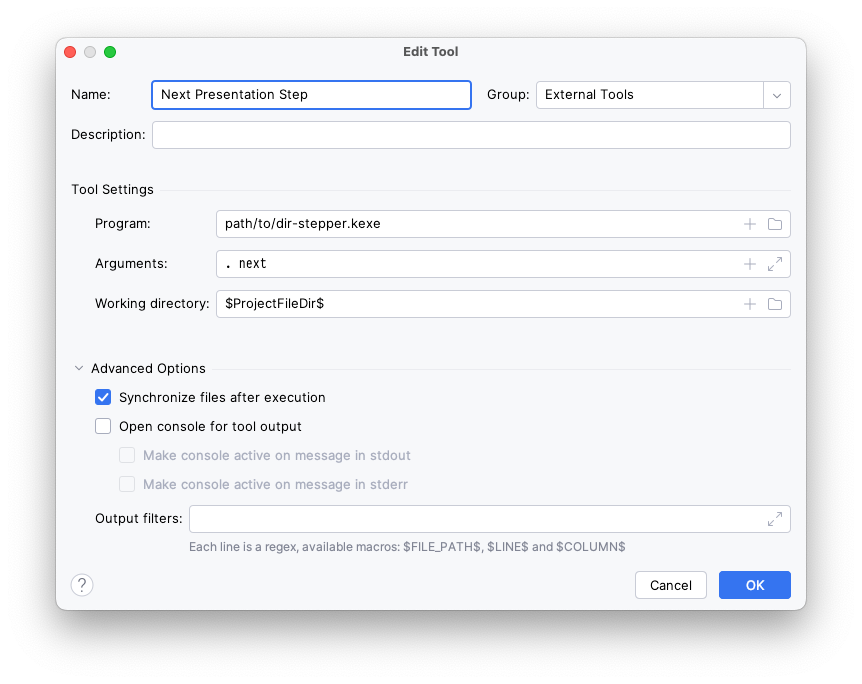
Once created, each of those tools can be given a dedicated keybinding.
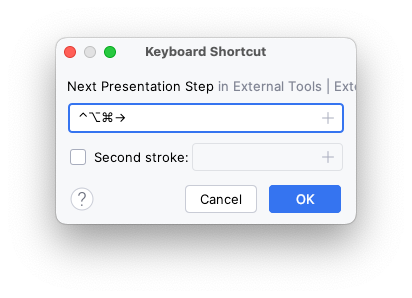
The keybinding allows me to change the step without the viewer seeing anything.
The last essential piece is to ensure the IDE is set to automatically sync external changes.
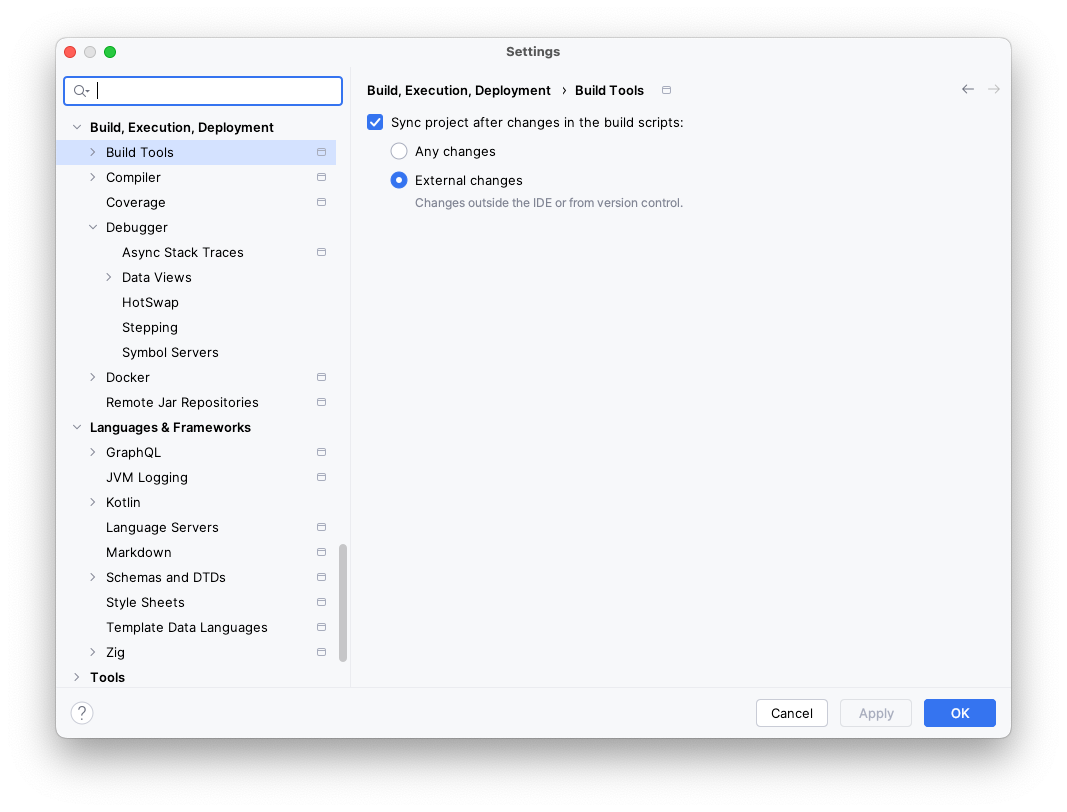
dir-stepper is open source if you want to try it out. There's also a video in the README that shows the full integration.
This worked spectacularly for my needs (when I remembered halfway through the talk that I was supposed to be using it). And as far as side quests go, it was entertaining, didn't take a long time to create, and ultimately made me more excited to finish the talk.
— Jake Wharton